Oskar-Luxonis
Hi Oskar,
Thank you for the clarification. I’d like to provide a bit more detail from my side.
First, on Linux the camera is not detected at all by oakctl list.
Therefore, all attempts using the oakctl commands mentioned below were performed on Windows, where the device is at least visible.
- OS update issue (even with internet access)
Even when the camera is connected to the internet, oakctl device update does not work.
I checked the changelog page below:
https://docs.luxonis.com/software-v3/sw-stack/luxonis-os/
For all changelog entries, the linked ZIP files cannot be downloaded manually (the page returns “Bad Page…”, see attached screenshot).

Because of this, it does not appear to be a local network issue on my side. It seems that the download server may not be functioning correctly.
Could you please check whether these OS package links are currently valid?
- SSH access issue
I tried to access the device via:
$$
ssh root@<IP_ADDRESS>
$$
However, I was prompted for a password, even though I never configured one.
According to the documentation:
By default, SSH access via password is disabled on devices running OS version 1.18 and newer.
I therefore tried:
oakctl device unlock
oakctl start-setup
But both workflows eventually require an OS update to proceed further.
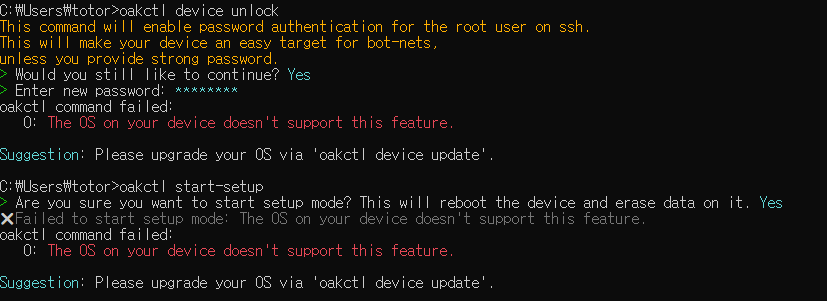
Since the OS update itself is currently failing (likely due to the server issue mentioned above), I am blocked at this step as well.
At the moment, the inability to update the OS (either online or via manual ZIP download) seems to be the main blocker.
I would appreciate it if you could confirm whether there is an issue with the OS download server or provide an alternative way to obtain the update packages.
Thank you for your help.

