Overview
At Luxonis, we’re building tools that make working with spatial AI and computer vision easier, faster, and more reliable. Luxonis Hub brings all of this together — a single platform that connects your devices, applications, and AI models in one cohesive ecosystem.
Hub offers two core capabilities: Hub Control and Hub AI. Together, they simplify how you develop, manage, and deploy intelligent vision systems at scale.
Hub Control
A Collection of Apps, Examples, and Device Management Tools
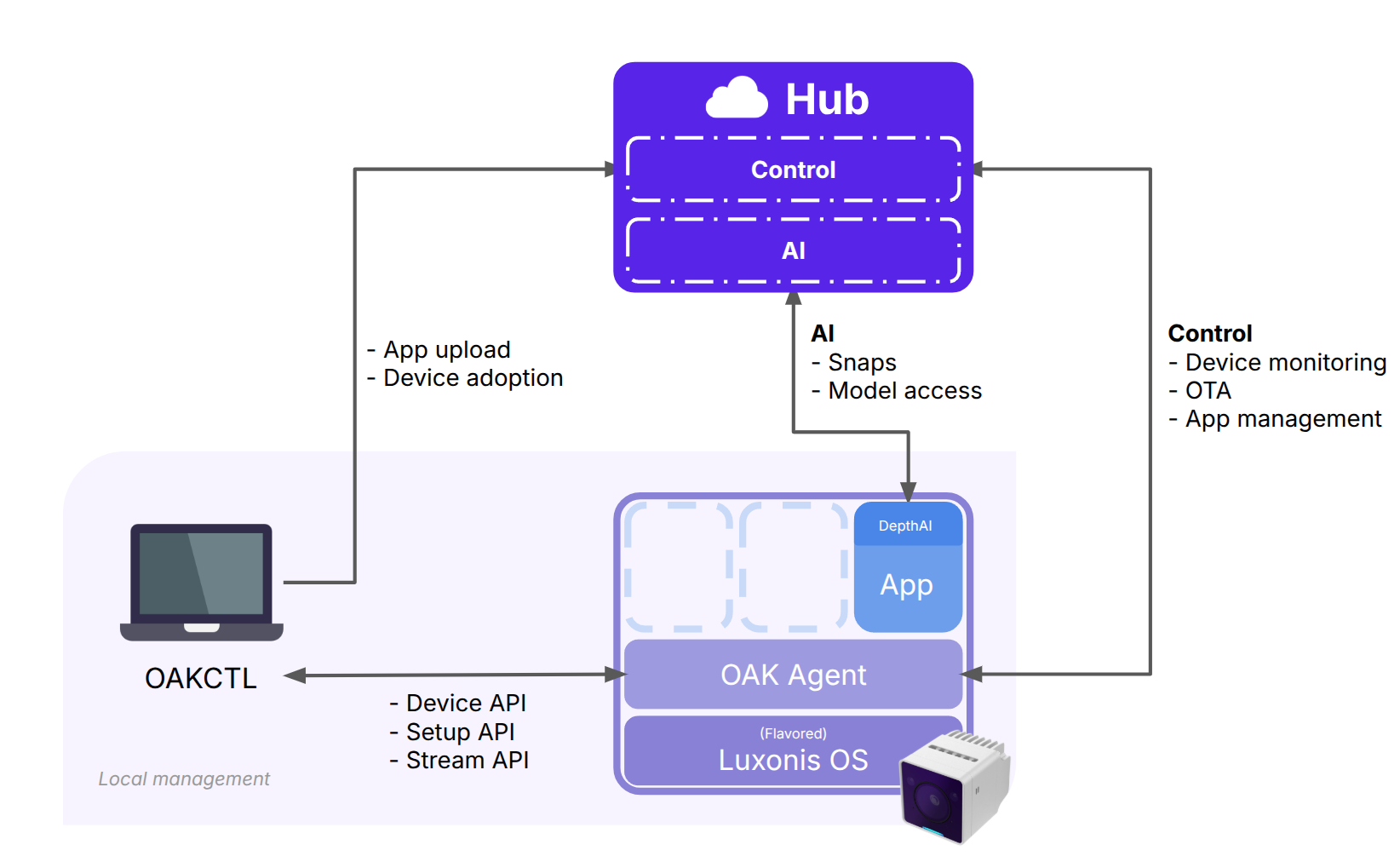
Hub Control is all about control and visibility. It serves as your central platform for managing OAK devices, running applications, and collecting data - all in one place.
With Hub Control, you get a growing collection of OAK Apps and examples that help you experiment, deploy, and control your devices. Whether you’re managing a single OAK camera or hundreds of devices in the field, Hub Control gives you unified access to deployment, updates, and monitoring.
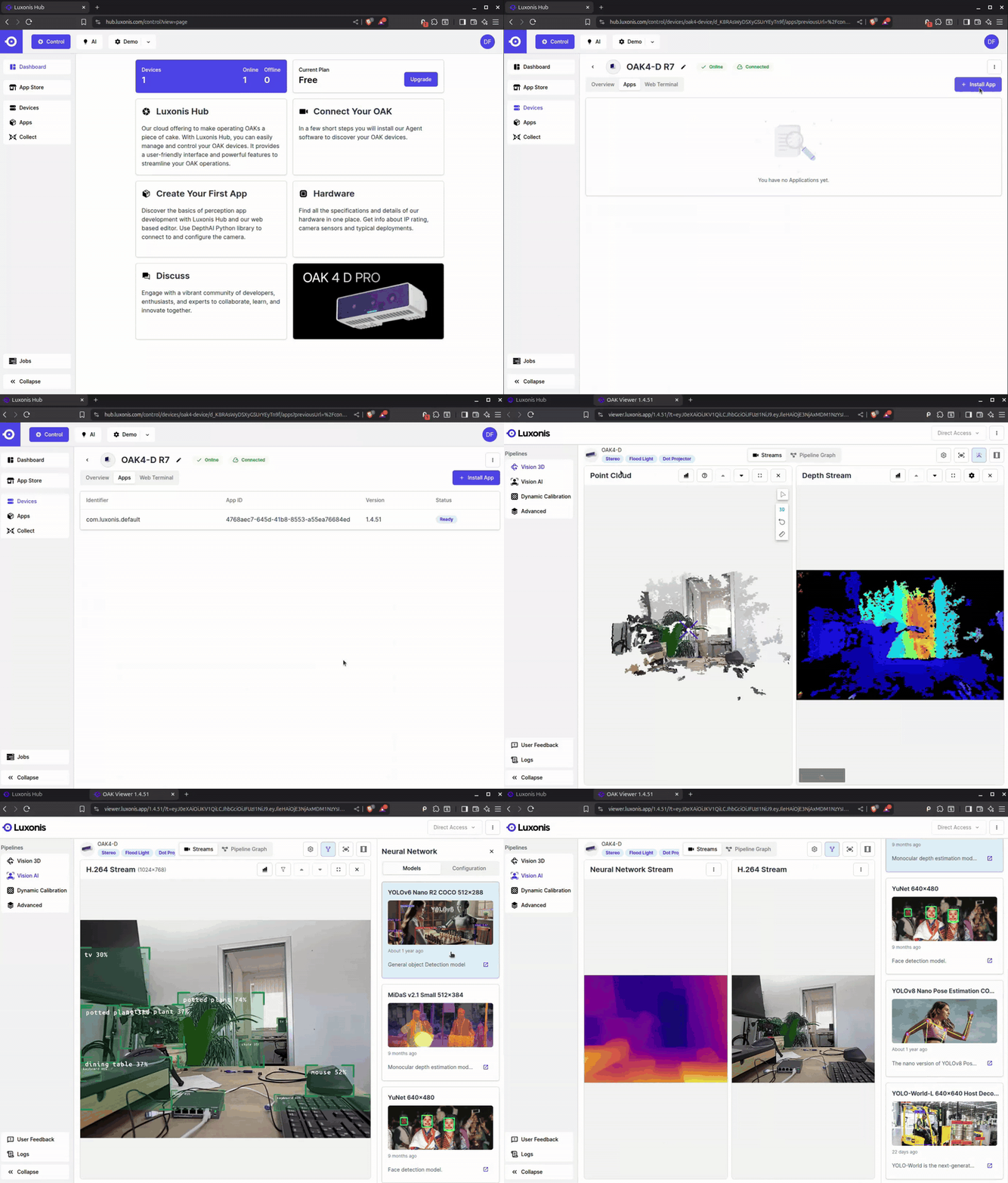
Installing and controlling OAK Apps
An OAK App is an application that runs on an OAK Agent. It’s typically written in Python or C++ and leverages DepthAI to interface directly with OAK cameras. Agent and Luxonis Hub can then be used to stream data remotely. Some OAK Apps are available directly on the Hub App Store.
What makes OAK Apps special is that they’re containerized - they behave the same way on every device, making deployments predictable and stable.
Using OAK Apps enables seamless streaming of video and event data directly to the browser, which allows for more decentralized operations without relying on the cloud.
App/OS OTA updates
Keeping your devices secure and up to date has never been easier. With Luxonis Hub, both your Device OS and App versions can be updated over-the-air (OTA) - directly from the Hub dashboard.
Why It Matters
Regular updates are crucial to maintaining optimal performance, stability, and security. With OTA updates, you can ensure that every device in your fleet runs the latest firmware, operating system, and security patches, without the need for manual intervention or physical access. This keeps your deployment current, compliant, and resilient against potential vulnerabilities.
Streamlined App Updates
Hub also simplifies how you manage and distribute application updates. You can easily move from local development and testing to fleet-wide deployment, all within a single, intuitive interface. Whether it’s pushing a new feature, improving performance, or deploying a new AI model, Hub’s update system ensures your entire fleet stays synchronized - saving time and reducing the risk of version drift across devices.

Snaps capture
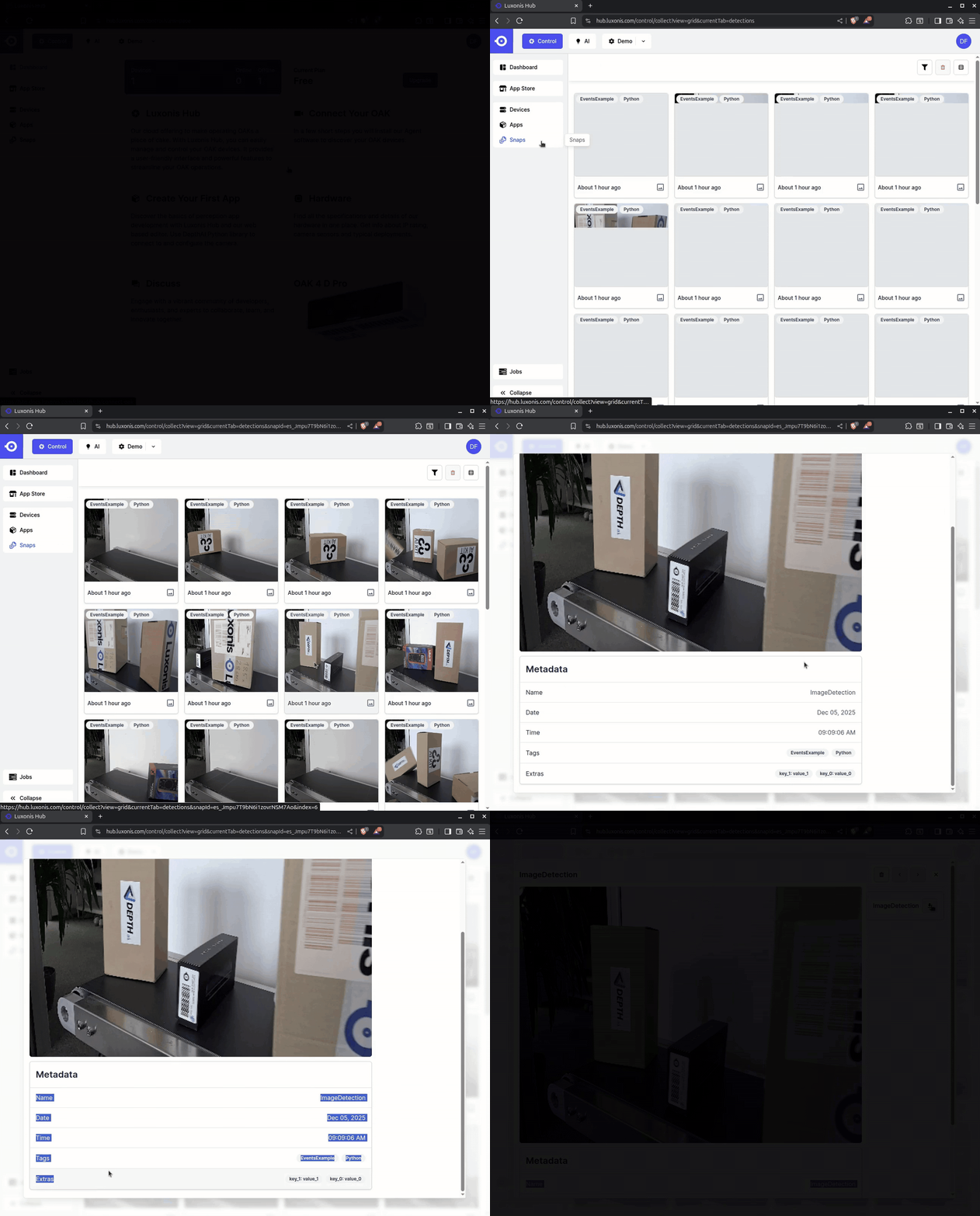
Snaps are the primary way to send data to Luxonis Hub, whether you’re growing datasets or centralizing project data. Each Snap includes a name that represents the type of event you’re sending—for example, image or Data Collection—and you’ll typically reuse the same name across many Snaps.
A Snap can include one or more attachments, such as still images, videos, or stereo data, with virtually no restrictions on what you can add. To support different workflows and analysis, you can organize and filter Snaps using tags and extras (simple key:value pairs), making it easy to search, group, and query at scale.
Why Snaps Matter
Snaps aren’t just about sending data — they’re about building smarter systems. By capturing what your cameras see, Snaps provide valuable real-world data that can be used to:
Record and analyze events detected by your devices in the field.
Feed data into analytics pipelines for insights, pattern recognition, or performance validation.
Collect and label images or videos to continuously improve the AI models running in your applications.
Snaps make it simple to close the loop between data capture, analysis, and model improvement, helping you build more intelligent, adaptive, and reliable vision solutions.
How to Create Snaps
- Data Gathering App is the easiest way to get started. Install the App from the Hub App Store and use it right away, no coding required.
- Snaps Uploader (from DepthAI nodes) - Ideal if you're building a basic custom app. You can check out its usage in oak-examples.
- Direct DAI Integration - Use this for full control and advanced customization.
More details are available in the documentation.
Agent installation
Luxonis OAK Agent is a software service that connects your OAK devices to the cloud so you can easily deploy, manage, and monitor AI vision pipelines remotely. It enables seamless integration with the OAK Cloud platform and supports OAK4 devices out of the box – no setup required.
- OAK4 runs out of the box with OAK Agent pre-installed
- Self-hosted option: If you don’t have an OAK4, the agent can run a connected computer (initially we plan to support RaspberryPi5 and latest Nvidia Jetson) using Docker.
Debugging & Logging tools
There are two control tools available in the Hub Control module: Web Terminal and Application Logs.
Web Terminal lets you securely access and control your OAK device’s operating system — directly from Hub, anywhere in the world. It provides a convenient, browser-based SSH-like connection so you can manage, configure, and troubleshoot your devices remotely without needing physical access.
Through the Web Terminal, you gain access to the same familiar tools you’d use to manage and control your camera when connected through Ethernet or USB - such as oakctl, agentconfd, and others. These tools run directly on the OAK device, giving you complete, real-time control over applications, system processes, and device status — all from within Hub.
Application Logs let you monitor what’s happening on your OAK devices in real time or review past activity. Through Hub, you can view log messages from each device, identify issues, and resolve them remotely — streamlining debugging and improving system visibility.

Hub AI
Hub AI is the AI companion to Hub Control, acting as a Model Registry for managing and deploying AI models across the Luxonis ecosystem.
It includes a curated collection of pre-trained models (model ZOO) optimized for OAK devices, with all public models also available at models.luxonis.com. Beyond that, Hub AI also supports:
- User-uploaded models,
- Model management tools, and
- Deployment utilities for getting models running on your devices in just a few clicks.
From training to deployment, Hub AI streamlines the entire model lifecycle so you can focus on building great applications — not needing to manage the infrastructure.
Creating new model Variant
If you’d like to create a new variant of an existing model — for example, the original model was designed for an input resolution of 384×512, and you want to add support for 444×754 — you can do so by creating a new model variant. To create it, select the model, click the Add Variant button, and follow the upload instructions.

Model conversion
You can convert public or private models into different RVC versions directly on the Hub AI with our conversion tool.

More about different options and parameters can be found on the documentation page.
Creating a model Version
As you make improvements to the model, you will want to create new versions to keep track of the changes. You can do so by clicking the Add Version for Variant button.

Security, Privacy, and Integration You Can Trust
At Luxonis, we know that reliability and data protection are critical when deploying connected devices at scale. That’s why Luxonis Hub is built with enterprise-grade security in mind and is fully SOC 2 certified — ensuring that your data, models, and device communications remain private, stable, and secure at all times.
In addition, Luxonis Hub offers a well-documented API layer, allowing you to seamlessly integrate its functionality into your existing workflows, dashboards, and automation systems. Whether you’re building large-scale deployments or integrating with in-house infrastructure, Luxonis Hub fits effortlessly into your ecosystem — giving you confidence in both performance and compliance.
You can read more about the SOC2 compliance in our separate blogpost.
