Getting a model onto an edge device can take more work than choosing the model itself. For larger models and more complex architectures, conversion can become a significant part of the project, especially when the model already works in another runtime.
OAK4 developers now have two additional inference paths: ONNX Runtime with QNN for ONNX models, and llama.cpp for language and vision-language models. Both bring existing model ecosystems to the device, with hardware acceleration through its Qualcomm Hexagon compute hardware.
The bigger change is what these models can do without a custom pipeline. A vision-language model can answer a plain question about what the camera sees, such as whether a walkway is blocked, a pallet is wrapped, or a machine guard is open, without a labeled dataset, a trained detector, or hand-written logic for each case. That makes OAK4 practical for monitoring and inspection jobs that were too varied, or too rare, to justify training a model. We have complete examples of both paths."
RVC4 standalone only. The deployments described here run inside an OAK App on an RVC4 device, with Luxonis OS 1.40.0 or newer. They are not supported on RVC2 or in RVC4 peripheral deployments.
Why add more inference paths?
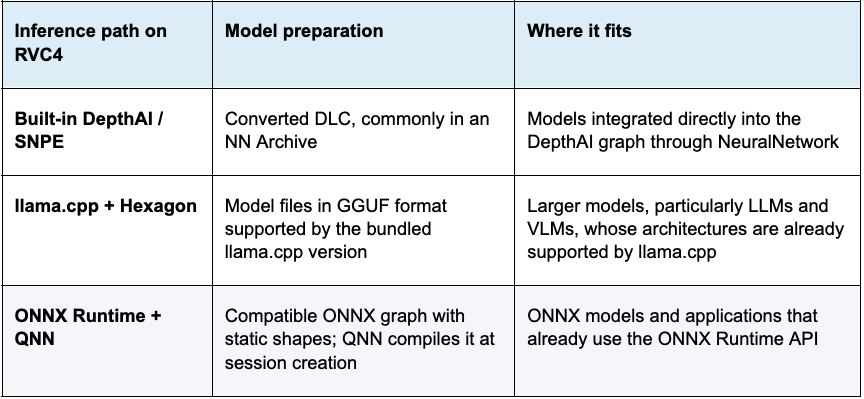
The established RVC4 workflow uses DepthAI's built-in NeuralNetwork node with a model converted through SNPE to a DLC, commonly packaged in an NN Archive. This provides direct integration with the DepthAI pipeline and remains the primary path for that workflow. See the DepthAI inference guide and RVC4 model conversion guide.
For some larger or more complex models, preparing that conversion can require substantial work. When a model already has a suitable ONNX export or is supported by llama.cpp, using its existing runtime may offer a more practical starting point.
These alternatives let the application load an ONNX or GGUF model without first producing an SNPE DLC. They still have model compatibility and preparation requirements: ONNX Runtime QNN needs a compatible graph, while llama.cpp needs a supported architecture and tensor types.
llama.cpp: ask questions about what the camera sees
Language and vision-language models such as Gemma, Qwen, and SmolVLM often already have GGUF releases for llama.cpp. The RVC4 llama.cpp path lets an OAK App use those supported models directly, with no SNPE or NN Archive conversion step. If you’re looking to deploy a VLM moel, ggml-org collection on Hugging Face is a good place to start. On OAK4, models in roughly the 0.5 to 2 billion parameter range are the practical sweet spot. Throughput varies by model, so measure on your own scene.
This llama.cpp VLM example uses Qwen3.5-0.8B, with Q4_0 language-model weights and the matching F16 vision projector. You can ask a question about the full camera frame or select a region to analyze. The answer streams into the interface as it is generated. On OAK4, Qwen3.5-0.8B generates about 29 tokens per second, and the first words of an answer typically arrive in about half a second. Short answers finish end to end in roughly 0.5 seconds, and longer ones in one to two seconds, depending on the prompt and how much the model writes.
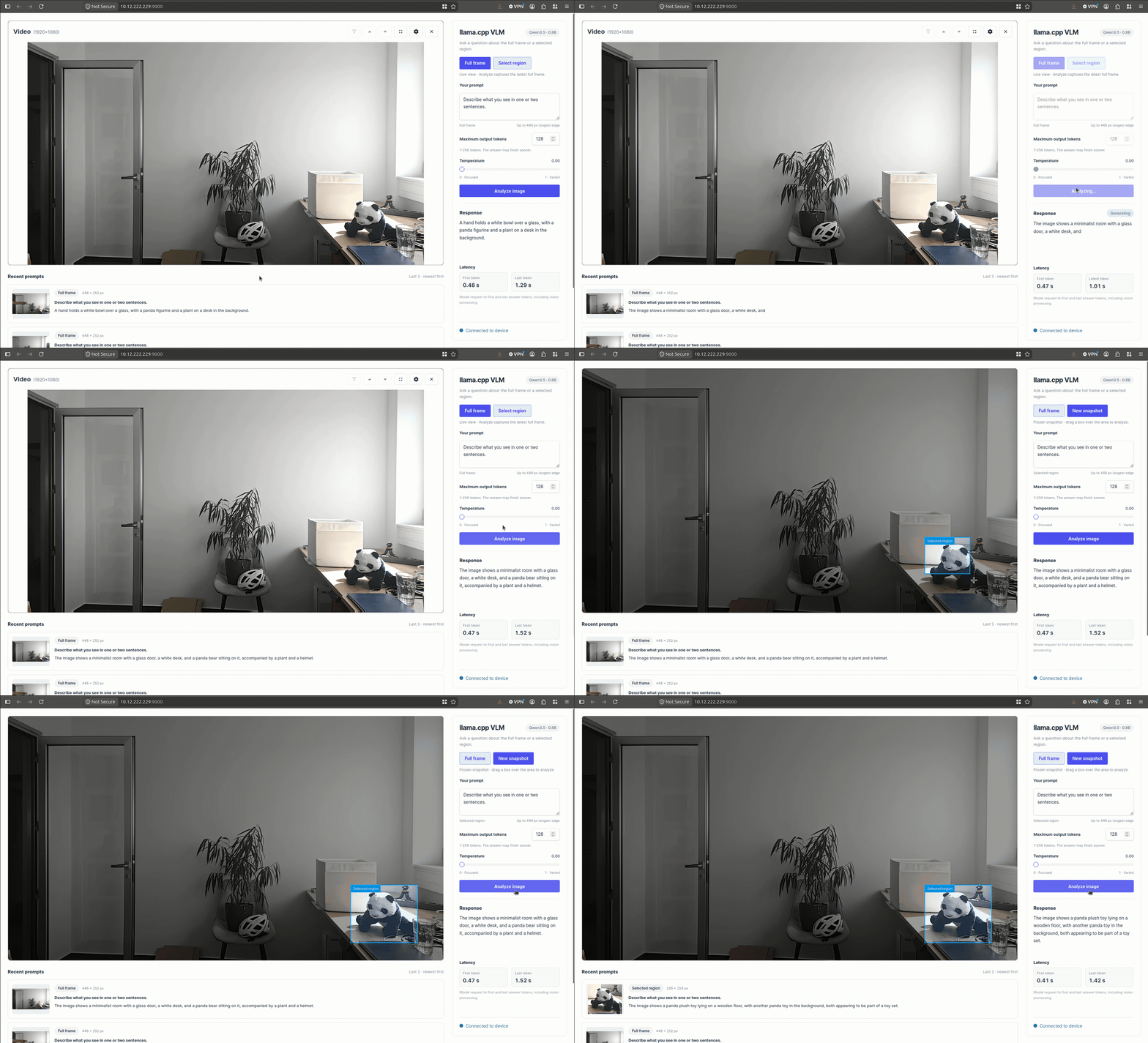
For example, point the camera at a workbench and ask, “What objects are on the table?” Then select a smaller region and ask, “Describe the object in this region.” These are prompts to try; the model's answer depends on the scene and its capabilities.
The app captures frames with DepthAI, prepares an image and prompt, and sends them to llama-server running locally on the device. Its OpenAI-compatible HTTP endpoint is a local interface; inference does not call a cloud model service. The example bundles model assets during the build.
Both the language model and vision projector request Hexagon HTP acceleration. llama.cpp uses its own Hexagon backend, independently of ONNX Runtime's QNN Execution Provider. Supported work is offloaded to the accelerator, while unsupported operations may execute on the CPU. The server logs report actual placement. See the llama.cpp inference guide for details.
The example is a starting point, not a fixed demo. Swapping in another llama.cpp-supported model mostly comes down to changing the model files and the prompt, and a coding agent with the Luxonis Agent Toolkit can make that change for you. We'll walk through it step by step in an upcoming post.
ONNX Runtime + QNN: select an object and track it
ONNX Runtime provides a familiar API for loading and running ONNX models. Its Qualcomm QNN Execution Provider sends supported model operations to the RVC4's Hexagon Tensor Processor (HTP), the accelerator used by this path.
The app ships an ONNX model, and QNN compiles it for the HTP when the inference session is first created. Compiled contexts can be cached to reduce subsequent startup time. This avoids an upfront DLC conversion, although the ONNX graph may still need adjustments for static shapes and supported operators. The ONNX Runtime QNN guide covers preparation and deployment.
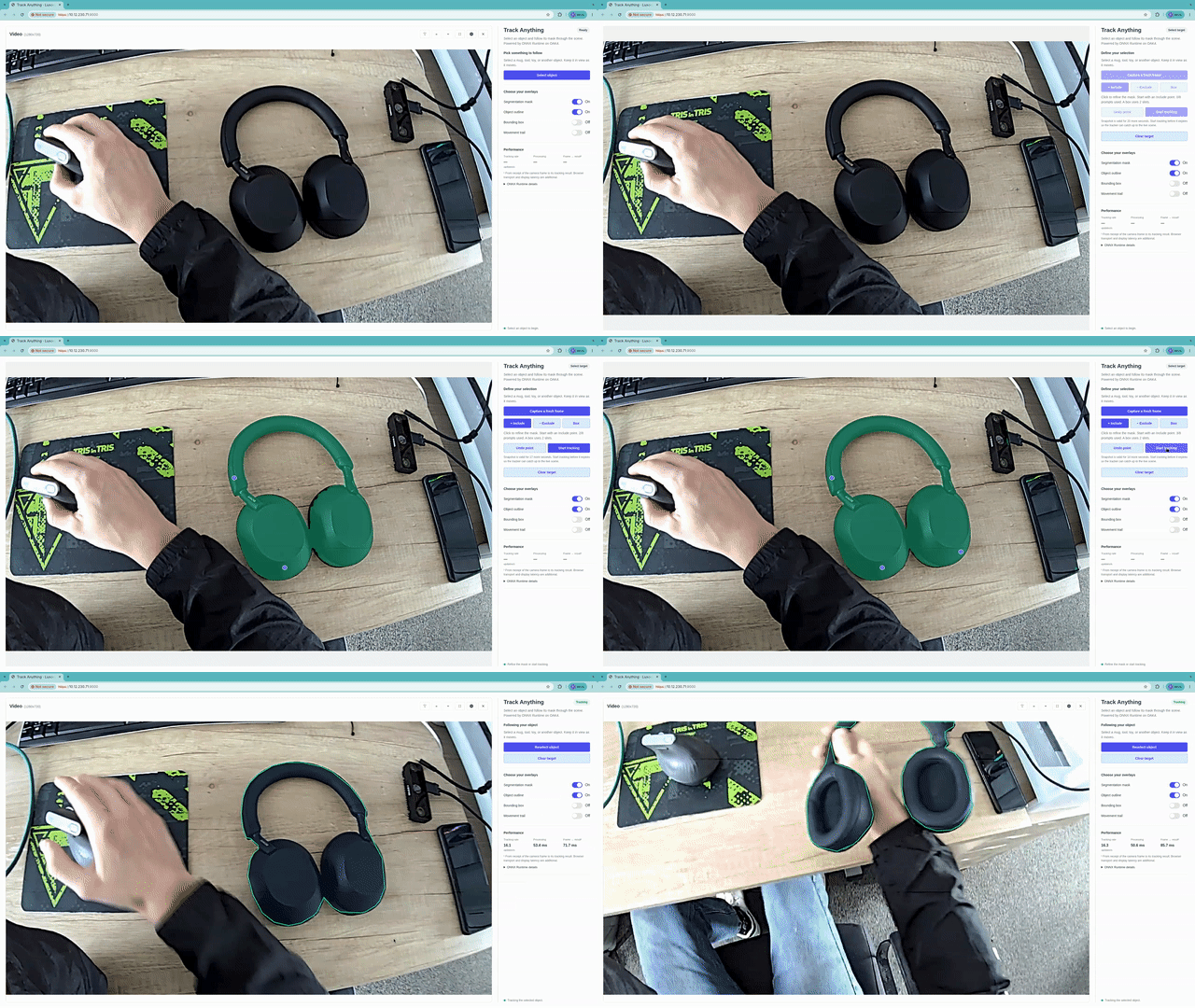
Our Track Anything example combines MobileSAM with Track-Anything's XMem tracker:
Capture a snapshot and select an object with points or a box.
Refine the selection with include/exclude points. MobileSAM produces the initial segmentation mask.
Start tracking. XMem propagates the mask through subsequent camera frames.
The actual tracking runs at ~16 frames per second so it’s viable for any real-time application. You can follow a selected object without choosing a predefined detector class. The interface shows its mask, outline, bounding box, and movement trail, with overlays paired to the camera frame used for inference.
More model options, with on-device acceleration
The benefit of these paths is the ability to use an existing model ecosystem while retaining access to the RVC4's AI accelerator. ONNX Runtime uses QNN to execute compatible graphs on the Hexagon HTP; llama.cpp uses its Hexagon backend to offload supported computation. This makes them useful options when a model already works in one of these runtimes and SNPE conversion would require additional engineering.
The built-in DepthAI path remains a strong choice for direct pipeline integration and optimized deployment. The ONNX Runtime performance comparison shows QNN FP16 broadly comparable to SNPE FP16 across the tested models, with SNPE INT8 delivering the highest throughput in that set. Choose the runtime around model support, integration effort, and measured performance for your application.
Where vision-language models fit
Most vision applications are built for one job: a model trained on a specific set of objects, with logic written for a specific scene. Vision-language models work differently. You describe what to look for in plain language, and change the question when the job changes.
That suits work where the thing you need to catch is varied, rare, or hard to define in advance:
Process checks: confirm a step on a line or in a warehouse was done, and done in the right order.
Alerts: flag when something looks wrong, like a blocked exit, a spill, a missing guard, or a person in a restricted area.
Scene questions: ask what's on a shelf, a bench, or a pallet without training a detector for every item.
VLMs also pair well with the models you already run. A fast detector like YOLO can handle the common cases at full frame rate, while a VLM takes a closer look at the frames it isn't sure about.
Small on-device VLMs aren't a replacement for a trained detector when you need precise, repeatable results on a well-defined task. Test them on your own scenes before relying on them.
Try the examples on OAK4
Start with an RVC4 device running Luxonis OS 1.40.0 or newer and install oakctl. Choose an example from the oak-examples repository:
From the chosen example directory, connect to your device and run the app:
oakctl connect <DEVICE_IP>
oakctl app run .
Open the frontend URL printed in the terminal and wait for model initialization to finish. The first build needs internet access to download dependencies and model assets. Each example includes its runtime-specific base image and device-access configuration.
Keep the built-in DepthAI path for models that fit your pipeline and deployment needs. When conversion becomes an obstacle, check whether ONNX Runtime QNN or llama.cpp already supports the model and workflow you want to bring to OAK4.
This is the first post in a series. Over the coming weeks we'll share more models running on OAK4 and the use cases they fit. What would you want to run on-device? Tell us in the comments, and we may build the next example around it.