With the release of DepthAI 3.4.0, we’re bringing full FSYNC (frame synchronization) support to OAK4 devices - unlocking precise multi-camera coordination across multiple devices.
Whether you're building multi-view perception systems, motion capture setups, or high-speed tracking pipelines, FSYNC ensures that all cameras capture frames at the exact same moment.
What is FSYNC and Why It Matters
Frame synchronization ensures that multiple cameras capture images at the same time, eliminating temporal offsets between streams. Without synchronization, even small timing differences can lead to:
Misaligned object positions
Poor multi-view reconstruction
Inaccurate depth or tracking results
With FSYNC, all cameras operate on a shared timing signal—making their outputs directly comparable frame-by-frame.
FSYNC in Action
To demonstrate FSYNC, we threw an object past six OAK4-D cameras stacked vertically.
We recorded the same test twice:
With synchronization enabled
Without synchronization
Synchronized Capture
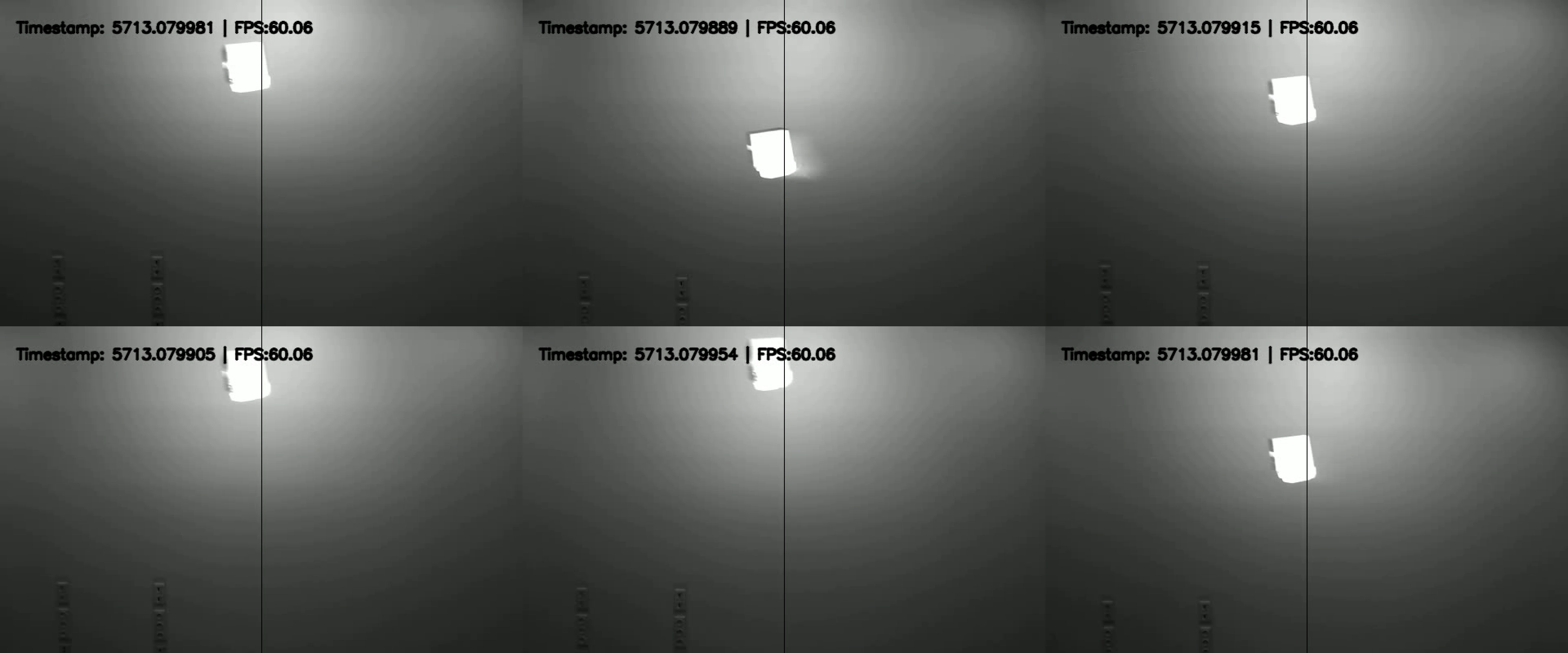
In the synchronized recording, the object appears in the same position across all camera streams.
Unsynchronized Capture
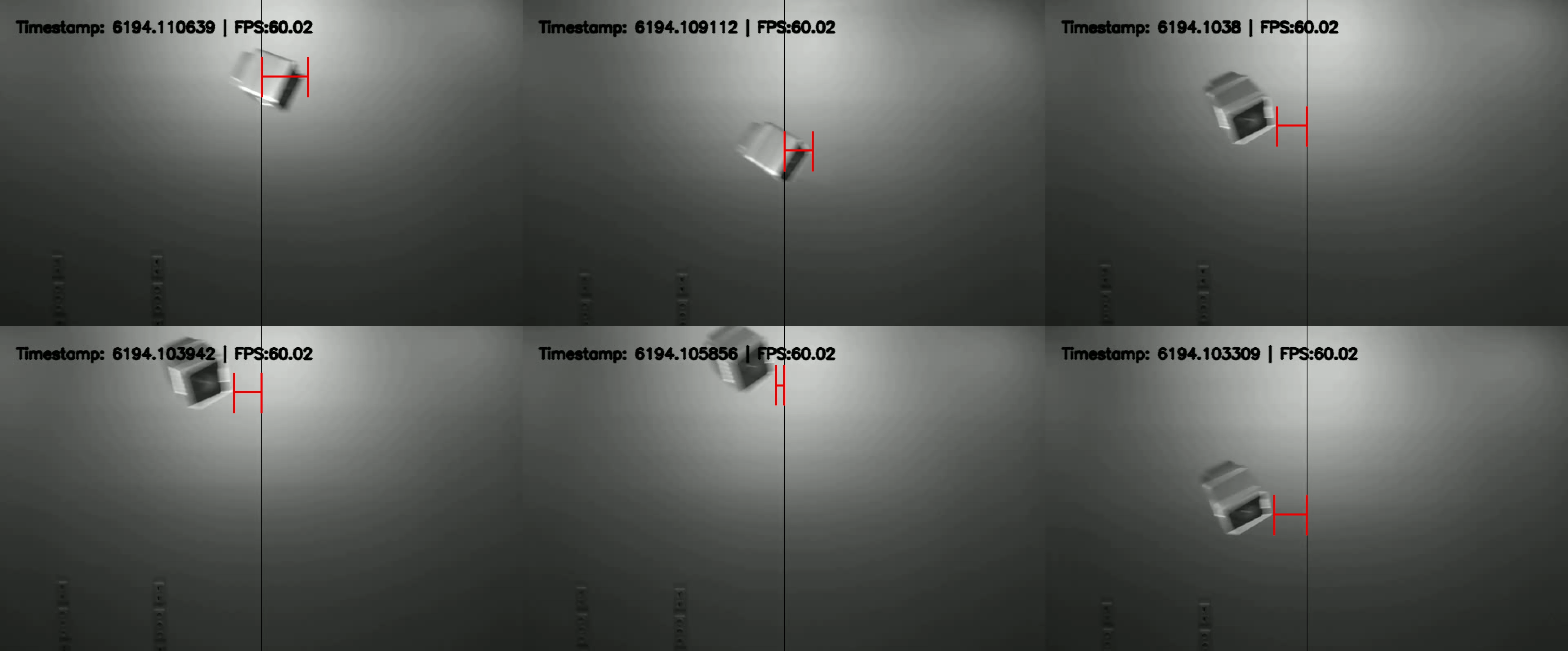
In the unsynchronized version, streams are clearly misaligned (highlighted in red), demonstrating the importance of FSYNC.
Note: Streams are recorded in black and white to reduce bandwidth when capturing six cameras at 60 FPS.
FSYNC via OAK Device (Daisy-Chaining)
You can synchronize multiple newer OAK devices, including OAK4, by daisy-chaining them using our FSYNC Y-Adapters.
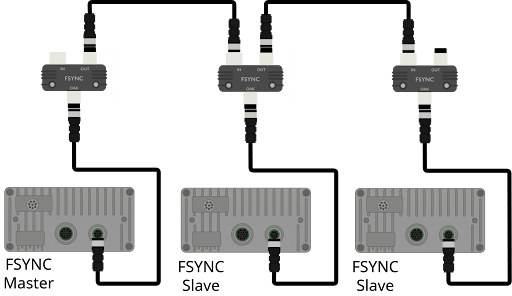
How It Works
One device acts as the FSYNC Master
All others act as FSYNC Slaves
The master generates the sync signal
Slaves follow that signal
The role is determined automatically:
⚠️ For more than 3 devices, signal integrity may degrade. Contact Luxonis support for larger setups.
Compatibility
Minimal FSYNC Setup (Code)
Here’s the essential setup for multi-device synchronization:
# Get role (MASTER / SLAVE)
role = device.getExternalFrameSyncRole()
# Master defines FPS, slaves follow
cam = pipeline.create(dai.node.Camera).build(
socket,
sensorFps=fps if role == dai.ExternalFrameSyncRole.MASTER else None
)
# Create Sync node (runs on host)
sync = pipeline.create(dai.node.Sync)
sync.setRunOnHost(True)
sync.setSyncThreshold(datetime.timedelta(milliseconds=1000 / (2 * fps)))
# Link camera outputs into sync
cam.requestOutput(...).link(sync.inputs["cam"])
# IMPORTANT: start master first, then slaves
master_pipeline.start()
slave_pipeline.start()
Key Concepts
Use getExternalFrameSyncRole() to determine device role
Only the master sets FPS
The Sync node runs on the host to group frames
All camera outputs are linked into the Sync node
Start order matters: master first, then slaves
Full examples are available in our repository:
Please check the guide on how to trigger externally with a function generator in the docs.
Final Thoughts
FSYNC support on OAK4 with DepthAI 3.4.0 enables robust, scalable multi-camera systems with precise timing alignment.
Whether you're chaining multiple devices or using an external trigger, you now have the flexibility to build tightly synchronized vision systems with minimal setup.
If you’re pushing beyond standard configurations or need help designing a larger setup, reach out to us at support@luxonis.com.
Ready to try it? Upgrade to DepthAI 3.4.0+ and start building synchronized multi-camera pipelines today.
Useful links:
